
Vyke: Second Phone/2nd Line
Vyke Holding LimitedCommunication
4.0484.00 Reviews
- Version
- 1.22.5
- Installs
- 1.00M
- Age Rating
- Everyone
Screenshots
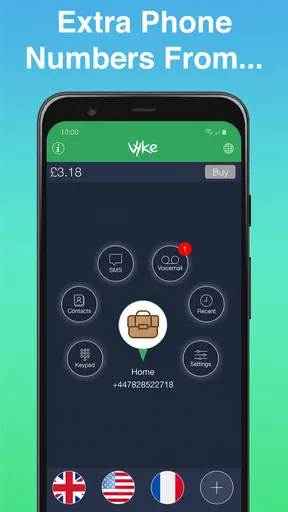
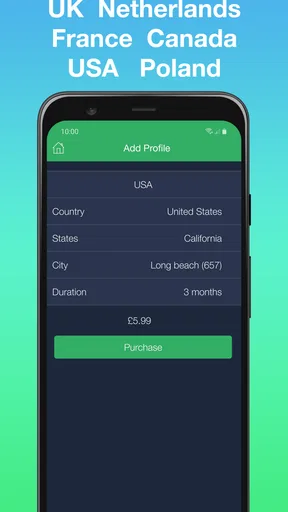
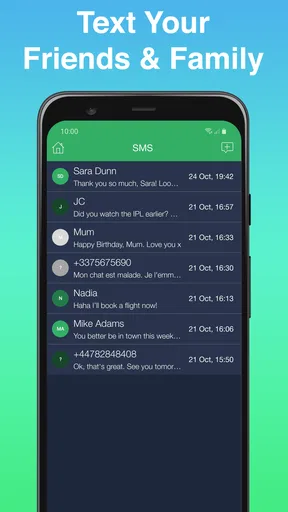
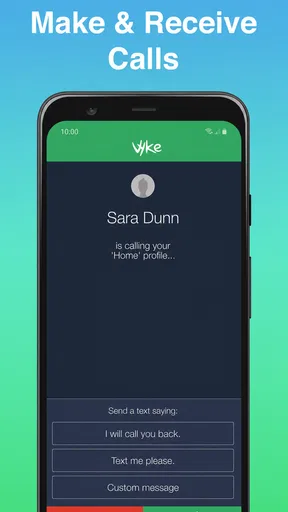
Our Review of Vyke: Second Phone/2nd Line
 Analysis by Appyee
When I need to share a phone number but would rather keep my everyday line private, a second-number app can be a practical middle ground between giving out my personal number and carrying another phone. Vyke: Second Phone/2nd Line is a communication app from Vyke Holding Limited, built around using an additional number for calls and texts. I see its main appeal in giving different conversations a clearer boundary, though it works best when I treat it as a separate contact channel rather than a complete replacement for my regular phone service.
A sensible rhythm for everyday use
My first step with an app like this is to decide what the extra number is for before I hand it out. A number for customer enquiries, marketplace conversations, or a short-term project is easier to manage when I use it consistently for that purpose. Mixing work contacts, personal friends, and one-off sign-ups on the same second line can recreate the clutter I wanted to avoid.
A realistic routine might be to put the second number on a small-business profile, check incoming messages at a set point in the day, and return calls from that line when I’m ready. That habit makes the separation useful even if both lines live on one phone. It also helps me notice which conversations need a reply without constantly treating every notification as urgent.
What to think through before sharing the number
Vyke is free to install, has an Everyone age rating, and its current version is 1.22.5. The app has a 4.1 average from around 15,000 ratings and has been installed over a million times. Those figures suggest that plenty of people are interested in a second line, but they don’t tell me whether a particular number will suit a specific account, recipient, or calling situation. I’d test the exact way I plan to use it before relying on it for something time-sensitive.
The practical question is not only whether I can call or text, but whether the other person can reach me reliably and understands which number to use. I’d make a test call and exchange a message with someone I know, then save the second number under a clear label in my contacts. That simple check can prevent confusion later, especially if I use both lines for different kinds of work.
What’s Vyke All About?
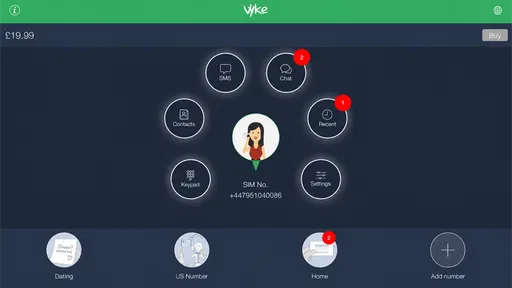
Alright, so the basic concept of Vyke: Second Phone/2nd Line is pretty straightforward. It’s an app that gives you a second line on your existing smartphone. Whether you need a new number for business, online dating, or just keeping things organized, Vyke has got you covered. You can get multiple numbers and switch between them seamlessly. Plus, it’s available on both Android and iOS, which is always a win in my book.
Setting Up Your Second Line
Getting started with Vyke is a breeze. After downloading it from the App Store or Google Play Store, you’ll be guided through a simple setup process. You can choose your area code, which is super handy if you want to appear local in a specific region. I liked that it didn’t require any complicated verification steps. It's like Vyke just gets that we’re all too busy for that nonsense!
Features That Stand Out
Once you’re all set up, you’ll notice a bunch of features that make Vyke really stand out. Here are a few that caught my eye:
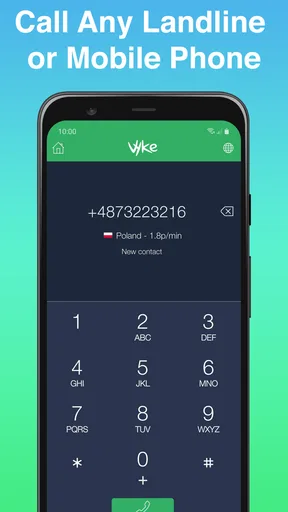
- VoIP Calls: Vyke allows you to make VoIP calls, which means you can call over the internet rather than using your mobile network. This is perfect if you’re looking to save on those pesky roaming charges.
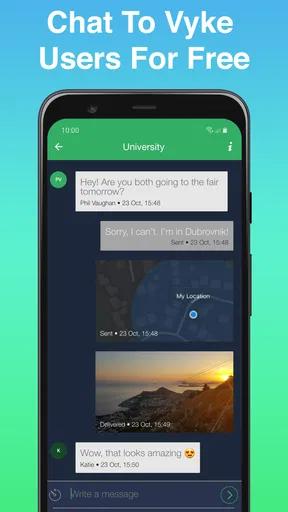
- Text Messaging: Not only can you make calls, but you can also send texts from your new number. This makes it super easy to keep your communications organized.
- International Numbers: Need a number from another country? Vyke lets you choose from a range of international numbers, which is a fantastic feature for those of us with friends or business abroad.
- Privacy: Perhaps one of the best things about Vyke is the privacy it offers. You don’t have to give out your personal number, keeping your main line spam-free.
Using the extra line with a little more care
One useful distinction is between a second number and a second device. Vyke keeps the extra line in an app on the phone I already carry, so I don’t have to manage another handset. In exchange, I need to remember that calls made through the app depend on an internet connection. For travel, that can be convenient when I have suitable data or Wi-Fi, but it is not a guarantee that every call will be free or work equally well everywhere.
I’d also avoid treating a virtual number as a universal substitute for a mobile number. Some services may have their own rules about which numbers they accept for account verification, and a number that works well for ordinary calls and texts may not be accepted everywhere. If an account is important, I’d check its requirements before replacing the number attached to it.
User Experience
I have to say, the user interface is super friendly. Everything is laid out in an intuitive way, and even if you’re not tech-savvy, you’ll find your way around in no time. There are no annoying ads popping up every five seconds, which is something I always appreciate in a free app.
Small habits that make the two-line setup clearer
I find it helpful to label the number by its purpose in my contacts and to use that same label when I tell people how to reach me. If I’m using one line for customers and another for friends, a quick note beside each contact can reduce the chance of replying from the wrong number. This is especially useful when I’m moving quickly between a personal conversation and a work message.
For a temporary project, I’d decide in advance how long I expect to use the number and which contacts need to keep it. That makes it easier to review the arrangement later rather than letting an old channel linger simply because it is already set up. The app is most useful when the second line has a clear job; it is less helpful when I add numbers without a plan for managing them.
Pricing Options
Vyke offers a variety of pricing plans to suit different needs. You can opt for pay-as-you-go or subscribe to a monthly plan if you need frequent use. I found the rates to be pretty competitive, especially when compared to traditional carriers. If you’re unsure, Vyke even offers a free trial, so you can test the waters before committing.
How it compares with familiar alternatives
Compared with asking my carrier for another line, an app-based number can be simpler to keep on the same phone and may suit someone who only needs an additional channel for calls and texts. A separate handset gives a more obvious physical boundary and can be better if I want work to stay off my personal phone, but it also means carrying and maintaining another device. A carrier-provided second line may be a better fit when dependable mobile-network calling or tight integration with a standard phone plan matters more than app-based flexibility.
There is also a trade-off with using a free internet-calling app that does not provide a dedicated number. Those services can be fine for conversations with people who already use them, while a second number is more useful when I need to give someone a conventional contact number. I’d choose based on who needs to reach me and how they expect to do it, not simply on which option has the shortest setup.
Who is likely to get the most from it?
I can see Vyke working well for freelancers who want a contact number for enquiries, people selling items who prefer not to publish their personal line, and travelers who want to make internet-based calls when they have a connection. It can also help someone keep dating conversations apart from family and work contacts. In each case, the benefit comes from deciding what belongs on the second line and using it consistently.
I’d skip it if I need guaranteed reachability regardless of internet access, if I don’t want to monitor another inbox, or if a service I rely on requires a particular kind of number. Someone who needs strict work-life separation may prefer a separate device, while someone who only calls a small group of existing contacts may find an ordinary messaging app less complicated.
Limits worth keeping in view
Calls over the internet make connection quality part of the experience, so I wouldn’t make an app-based line my only route for urgent communication. I’d keep my regular phone service available and use the second number as a convenient additional channel. The same caution applies to travel: access to Wi-Fi or mobile data matters, and roaming savings depend on the connection and the way I use it rather than being automatic.
Costs deserve a quick check before regular use. The app is free to download, but it includes in-app purchases ranging from $1.49 to $49.99 per item. I’d review the available options in the app and match any spending to my actual calling and messaging habits instead of assuming that installing it makes ongoing use free.
Final Thoughts
So, what’s the verdict? Well, if you’re looking for a hassle-free way to get a second line without all the baggage, Vyke: Second Phone/2nd Line is definitely worth checking out. It’s packed with features that cater to both personal and professional needs, and the flexibility it offers is unmatched. Whether you’re a frequent traveler, a small business owner, or just someone who likes to keep their digital life in order, Vyke has something for you.
Overall, it’s a solid app that delivers on its promises, and I’d recommend giving it a shot. So, what are you waiting for? Go ahead and download it. You might just wonder how you ever managed without it!
A grounded way to decide
My recommendation comes with a simple condition: start with one clear reason for having the number, then try the ordinary tasks you expect to use it for. Send a message, place a call, and ask a trusted contact to reply. If that workflow feels comfortable and the number behaves as you need, the extra separation can be genuinely handy without adding another phone to your pocket.
If you’re comparing options, think about where the boundary matters most. Vyke is appealing when the boundary is about which number you share; a second device is stronger when the boundary is about when and where you work. For me, that distinction is the key to deciding whether an app-based second line is a helpful everyday tool or just one more place to check.
Verdict
Strengths of Vyke: Second Phone/2nd Line
- Easy setup for multiple numbers.
- Affordable international calling rates.
- Secure messaging options.
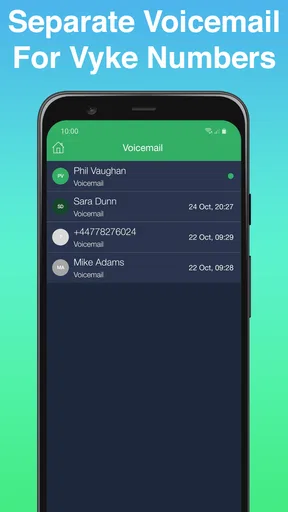
- Customizable voicemail greetings.
- No extra SIM card needed.
Limitations of Vyke: Second Phone/2nd Line
- Requires stable internet for calls.
- Limited free features available.
- Occasional app crashes reported.
- Not compatible with all devices.
- In-app ads can be intrusive.
Similar Picks in This Category
View All
Google Messages
Google LLC4.6

Gmail
Google LLC4.1

Google Meet
Google LLC4.4

Google Chrome
Google LLC4.1

WhatsApp Messenger
WhatsApp LLC4.6

Carrier Services
Google LLC4.2
Frequently Asked Questions
What is Vyke and how does it work?
Vyke is an app that provides users with multiple phone numbers on a single device, allowing them to make calls and send texts without the need for additional SIM cards. This is ideal for separating work and personal calls or for those who travel frequently. The app uses VoIP technology, meaning you can use your internet connection to communicate.
Is Vyke available for both Android and iOS devices?
Yes, Vyke is available for download on both Android and iOS platforms. You can find the app on the Google Play Store for Android devices and the Apple App Store for iOS devices. This makes it accessible to a wide range of users, regardless of their preferred smartphone brand.
What are the costs associated with using Vyke?
Vyke offers a range of pricing plans to suit different needs. While the app itself is free to download, users will need to purchase credit or subscribe to a plan for making calls and sending texts. These plans are often more cost-effective than traditional carrier rates, especially for international communication.
How secure is Vyke for making calls and sending messages?
Vyke prioritizes user privacy and security. The app uses encryption to protect your calls and messages, ensuring that your communication remains private. Additionally, since Vyke allows you to use separate numbers, it adds an extra layer of privacy by keeping your personal number hidden.
Can I use Vyke without an internet connection?
Vyke requires an internet connection to function, as it operates on VoIP technology. You will need either Wi-Fi or mobile data to make calls and send messages. However, this means you can use Vyke anywhere in the world with an internet connection, often at a lower cost than traditional roaming charges.
